

See how this song was written.
Stems and MIDI put each part in your hands. Musical ideas then read the whole song: how it is built, how the chords move, and which chords were chosen on purpose. If the original sounds more machine-made, the track is marked.
Installer download coming soon
- Musical ideas: form, particular chords, chord motion
- Source notice: a machine-made original is marked
- Analysis stays on this Mac. Audio is not uploaded
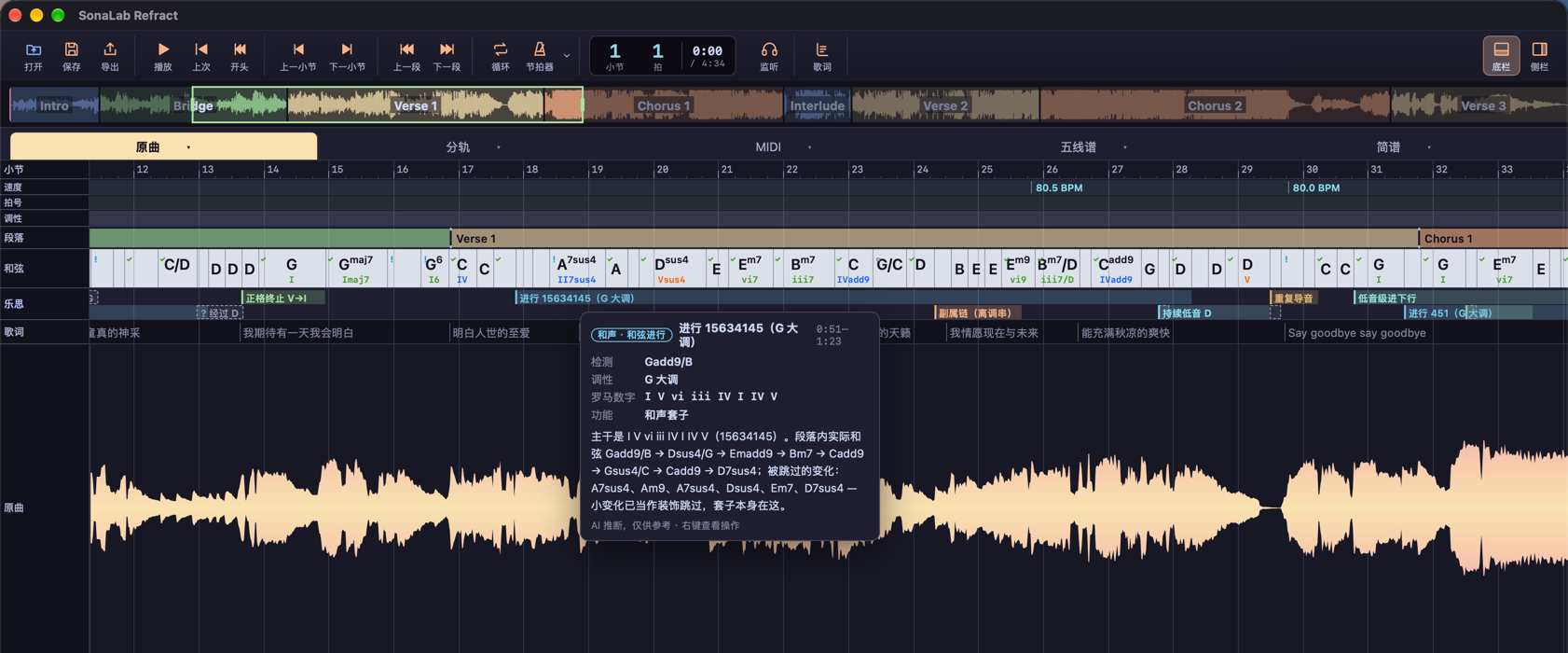
Open a song, and see how it was written.
Form, particular chords, and chord motion are on the musical ideas. Something that sounds machine-made gets its own mark.
Installer download coming soon
It currently runs on a Mac with Apple silicon.
The writing of the whole song, read along the timeline
Open a song, and Prism does more than list chord names. Musical ideas put the writing back on the bars where it happens: what key this passage is in, which kind of motion it is, and which chord in the middle is a secondary dominant, a borrowed chord, a color chord, or a cadence.
Chord cells are colored by how they feel: bright, dreamy, sad, still, blues, tense. Along the timeline you can see how the color of the whole song changes. Open a key, and you see which notes are in it, and how it sounds.
There are two kinds of marks. A solid mark is the writing, a device the song actually uses. A dashed mark is a place to hear again: this chord may not have been read correctly. Uncommon does not mean misheard.
Open one, and you see the chord, key, Roman numerals, the reason, and a suggestion. You can change the chord, accept the suggestion, hide it for now, or write your own note beside it. The note stays in the project. The same song can be read as pop, classical, or jazz.
Sometimes one passage can be read in two keys. Musical ideas mark that as a two-angle reading, with both keys side by side. The score uses one of them for the Roman numerals first. Which one to keep is up to you.
How this song is built
- The song is split into passages, and each passage has its own key
- A modulation is marked on its own, including a later lift into a higher key
- Tempo and meter changes sit on the same timeline. If a beat does not line up, you can move it
- Chords show the name, the bass, and the Roman numeral. Tonic, subdominant, and dominant are separated by color
- The ground color of a chord cell is how it feels, so you can see whether a passage leans bright or dark
How the chords move
A real progression often includes inversions, passing chords, and added tones. Musical ideas pull the backbone out of each passage and name the whole passage as one motion, for example:
1645
I–vi–IV–V
4536
IV–V–iii–vi
1625
I–vi–ii–V
6451
vi–IV–V–I
251
ii–V–I
Canon
I–V–vi–iii–IV–I–IV–V
Cadences are marked on their own: authentic, plagal, deceptive, and ii–V–I. Roots falling by fifths in a row are marked as a circle of fifths.
Which chords were chosen on purpose
- Secondary dominants, including a chain of them. Ones that land on their target, and ones that do not resolve, are both noted
- Borrowed from the parallel mode, such as a minor subdominant, a flat six, or a flat seven
- Color chords: augmented, diminished seventh, Neapolitan
- Tritone substitution
- Modal harmony, such as a Dorian or Mixolydian reading
- Parallel motion: a set of the same kind of chord sliding together
- Bass: a pedal that stays while the chords above change, or a bass that walks by step, including by semitone
- An inversion that can rest, with the bass on the third or the seventh
Places to hear again are marked as a possible misread, an uncertain read, a decorative chord, or something outside the key that still needs explaining. An uncertain chord comes with other candidates. Parallel fifths and octaves between parts, and a leading tone stacked inside a dominant, get a separate note. When a sung pitch and the written note do not match, it is marked “vocal transcription to check.” The notes on the score are not changed because of that.
Aside from the writing, places in the arrangement worth hearing again are marked on the musical ideas too:
- The bass on a strong beat is not the root
- Piano and bass land on the same note
- The piano is all one velocity
- The pedal crosses a chord change
- The guitar has a run of very short notes outside the chord
These are reminders. The notes, the velocities, and the pedal stay where they were, until you have heard them and decide to change them.
Click a chord to hear it. Double-click to rename, split, merge, or delete it. A keyboard lights the notes in the chord, and lists who is playing them: which track carries the root, the third, the seventh, or another chord tone. A chord you changed stays changed.
Does this song sound machine-made
Suspected AI-generated
When analysis starts, Prism looks at whether the original sounds more human-made or more machine-made. When it is fairly sure, a mark appears beside the track name. The hover text reads “Suspected AI-generated.” When it is not sure, it does not mark anything.
Stems you import are looked at one by one. If the vocal is a recording and the accompaniment sounds generated, only those accompaniment tracks are marked. Tracks the app split itself follow the judgment of the whole song.
This is a notice. Analysis does not stop. MIDI, scores, chord charts, and lyrics do not carry the conclusion.
A mark can be wrong, and a machine-made song can be missed.
After the writing is marked, hear who is playing
The detailed split gives vocals, drums, bass, piano, and guitar. Sound that does not fall into those instruments stays on its own track, labeled residual. You can also split only into vocals, drums, bass, and other, only into vocals and accompaniment, or leave the song whole and turn it straight into notes.
Each track can be heard alone, muted, or turned up and down. The transcription can sit on top of the original, or you can hear the original on one side and the transcription on the other. The chord a musical idea marked can be checked with only the piano or the bass left in.
If you already have stems, drop them in. If you have stems and no mix, Prism builds a mix first so there is something to compare.
The song you just read, you can take with you
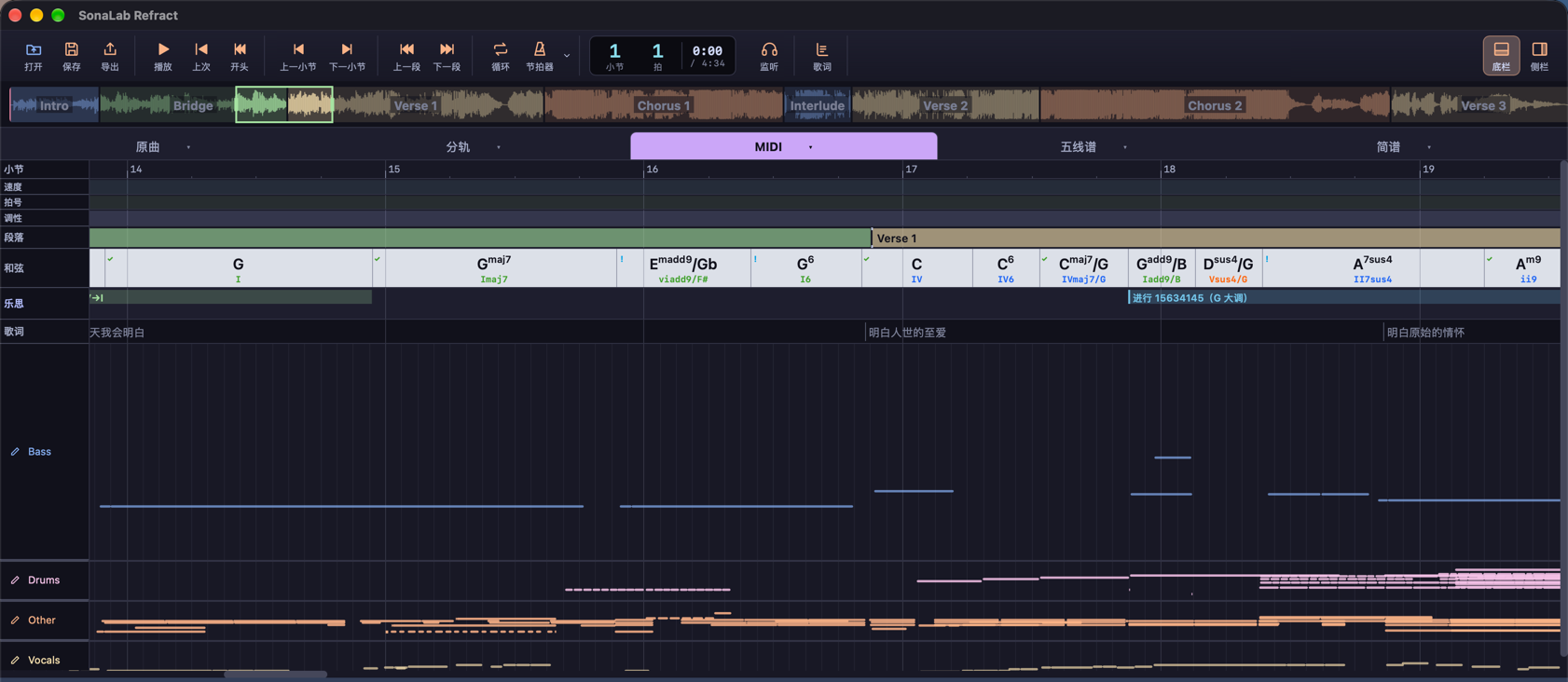
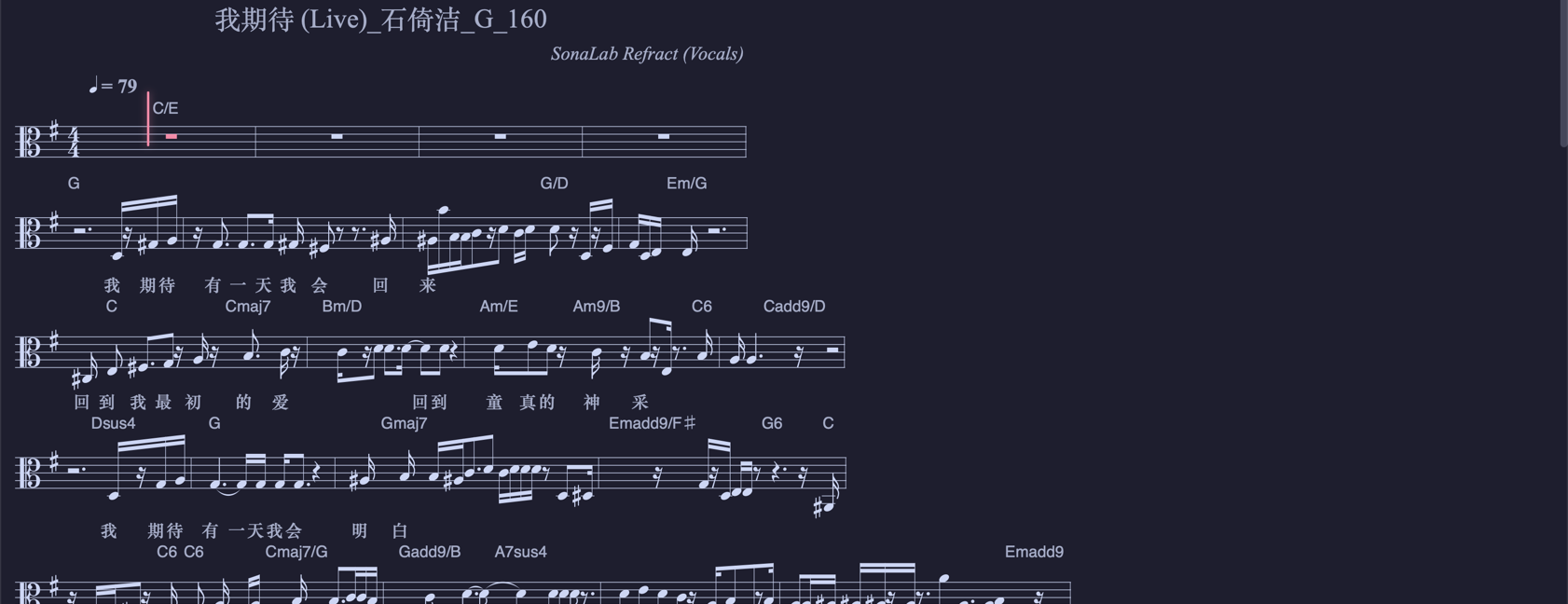
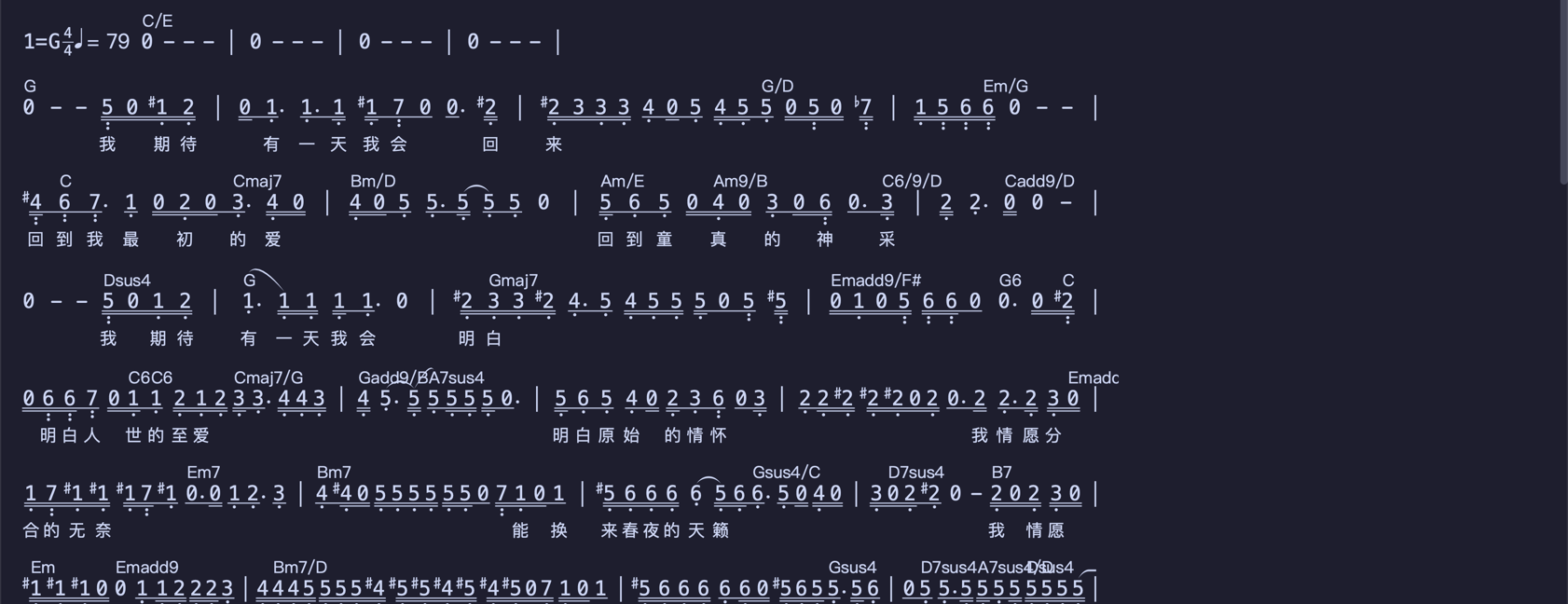
Vocals, piano, bass, guitar, and drums each get a MIDI file, on the original tempo. A pickup and a tempo change in the middle of the song are written into the file, so the bars still line up in your own software. In the piano roll you can fix a wrong note: move it, change its length, change its velocity, undo. Piano pedal that was already there is kept.
The same melody can be read as a staff or as numbered notation. The score carries chords and lyrics, and the current note follows playback. Drums have a drum score. Guitar and bass have a fingering score. A chord chart, a guitar chord sheet with a capo suggestion, a lyrics file, and a PDF score can all be exported.
Lyrics sit on the timeline one character at a time, and each block is how long that character was sung. You can listen to the vocal and have the words recognized, or paste words you already have, one line per phrase. They spread along the vocal first, and then you drag each phrase’s edges. If a line does not line up, you can move that line, or the whole lyric, to the playhead. A lyrics file can be imported and exported, or you can search and drop one in. During playback, the current line is enlarged above the lane.
For practice, tempo can move from half speed to one and a half, with the pitch held, or the pitch can move by up to twelve semitones. Loop a passage. The metronome follows the detected beat, and a count-in can play before the start. The tonic, tonic chord, and scale follow the key of the current passage. The slower tempo, the transposition, and the metronome can be baked into a practice recording.
The vocal line, opened on its own
Open Vocal analysis. The pitch that was sung runs along the timeline, with the vocal stem underneath. Pitch is written as note names. Sharp, flat, and in tune use different colors, so you can hear them against the original phrase.
Once there are lyrics, each character’s mix and register are marked on the same timeline. Mix shows a shouted strong mix, a balanced mix, a light mix, an airy mix, full voice, falsetto, and whistle. Air is the lightest, and strong mix is the deepest. Register is marked by general height: chest, first bridge, second bridge, third bridge, then head voice and whistle above that. It shows which band this phrase was sung in.
When the sung pitch and the written note do not match, the musical ideas show “vocal transcription to check.” Open this page and hear them against each other. The notes on the score stay where they are, until you decide whether to change them.
Analysis happens on your computer
Prism is a macOS app for Apple silicon. The song is not uploaded. Before the first analysis it needs a network connection, to prepare what it uses onto this machine. The project stays on this computer, or can be packed into one file and opened on another Mac.
Several songs can wait in a queue. Stop in the middle, and the next time it continues from the step already finished. If a recording is out of tune, Prism corrects it before analysis and writes down how far it was off.
When to use it
- You want to see how a reference song is built: passages, key, chord motion, and which chords were chosen on purpose
- You hear an unusual chord and want to know whether it is a secondary dominant, a borrowed chord, a modulation, or a possible mishearing
- One passage can be heard as two keys, and you want both readings kept so you can choose
- You have a song and want to know whether it sounds machine-made before you decide what to do with it
- You want to see which notes the vocal sang, how the mix changes on each character, and which register this phrase sits in
- After the writing is clear, you take the parts, the lyrics, and the notes into your own software, or slow them down to practice
Specs
| System | macOS, Apple silicon |
|---|---|
| Input | Local MP3, WAV, FLAC, OGG, M4A; existing stems can be imported |
| Musical ideas | Form and modulation; chord motion (such as 1645, 4536, 251, canon); secondary dominants, borrowed chords, color chords, tritone substitution, mode, parallel motion, cadences, bass line, pedal, inversion |
| Color and reading | Chords are colored bright, sad, blues, tense, and so on. Open a key to see its scale and how it feels. Two key readings sit side by side |
| Arrangement notices | Bass on a strong beat is not the root, piano and bass on the same note, piano all one velocity, pedal across a chord, a short run of guitar notes outside the chord. Notices only |
| Hear again | Possible misread, uncertain read, decorative chord, outside the key and still to explain; parallel fifths and octaves between parts; vocal transcription to check |
| Source notice | The original, and stems you import. When it is fairly sure, it marks “Suspected AI-generated” |
| Stems | Detailed (vocals, drums, bass, piano, guitar, plus the rest), a fast four-track split, vocals and accompaniment, or the whole song transcribed as it is |
| Compare | Original, stems, note preview, overlay, and split listening left and right. A chord can show the keyboard and who is playing it |
| Scores and export | Staff, numbered notation, drum score, fingering score, MIDI, MusicXML, ABC, chord chart, guitar chord sheet, lyrics file, PDF, practice audio, project bundle (.steam) |
| Lyrics | One character at a time. Dictation, paste and align to the vocal, import and export, search and drop in. The current line can be enlarged |
| Vocal | Pitch as note names, with sharp, flat, and in tune marked apart. With lyrics, each character shows its mix and register. Register follows general height |
| Practice | Tempo 50%–150%, transpose ±12 semitones, loop, metronome, count-in. Beats can be moved |
| How it runs | On-device analysis. A song takes a while. Results do not appear as it plays |
The source notice stays on screen. It is not written into exported files. What you open is a file on this machine. Mixing, and writing further, happen in your own software.
PDF needs a notation setup already on this Mac.
Questions
What is Prism mainly for?
To read how a song was written. Musical ideas mark how it is built, how the chords move, and which chords were used on purpose. Stems, lyrics, and MIDI are for checking, editing, and taking with you.
Do musical ideas change the chords on their own?
No. They mark the writing, and the places to hear again, on the timeline, and they give a reason and a suggestion. Whether to change anything is up to you. A note you write stays. If one passage has two key readings, both stay.
What about a song that sounds machine-made?
When it is fairly sure, “Suspected AI-generated” appears on the track. When it is not sure, it does not mark anything. Analysis continues. Exported MIDI, scores, and chord charts do not carry that judgment. Stems you import are judged one by one.
What do you see on the vocal page?
Every note that was sung, and, once there are lyrics, the mix and register of each character. Register follows general height, so you can see which band this phrase was sung in. When that does not match the written note, the musical ideas mark “vocal transcription to check.” Open the vocal page and compare. The score does not change itself.
Is the song uploaded?
No. Analysis finishes on your Mac. Before the first use it needs a network connection, to prepare what the analysis uses onto this machine.
Which computers can run it now?
macOS, on Apple silicon.
Can I arrange the song in here?
Prism turns what it heard into musical ideas, chords, scores, and notes, and lets you fix a note it heard wrong. Mixing, and writing further, happen in your own software.